

Hot cues that keep time
Sixteen hot cues, eight on each page of pads. With Q on, a jump keeps your place in the beat. Press the same pad again and you're straight back at its cue, however fast you press it.
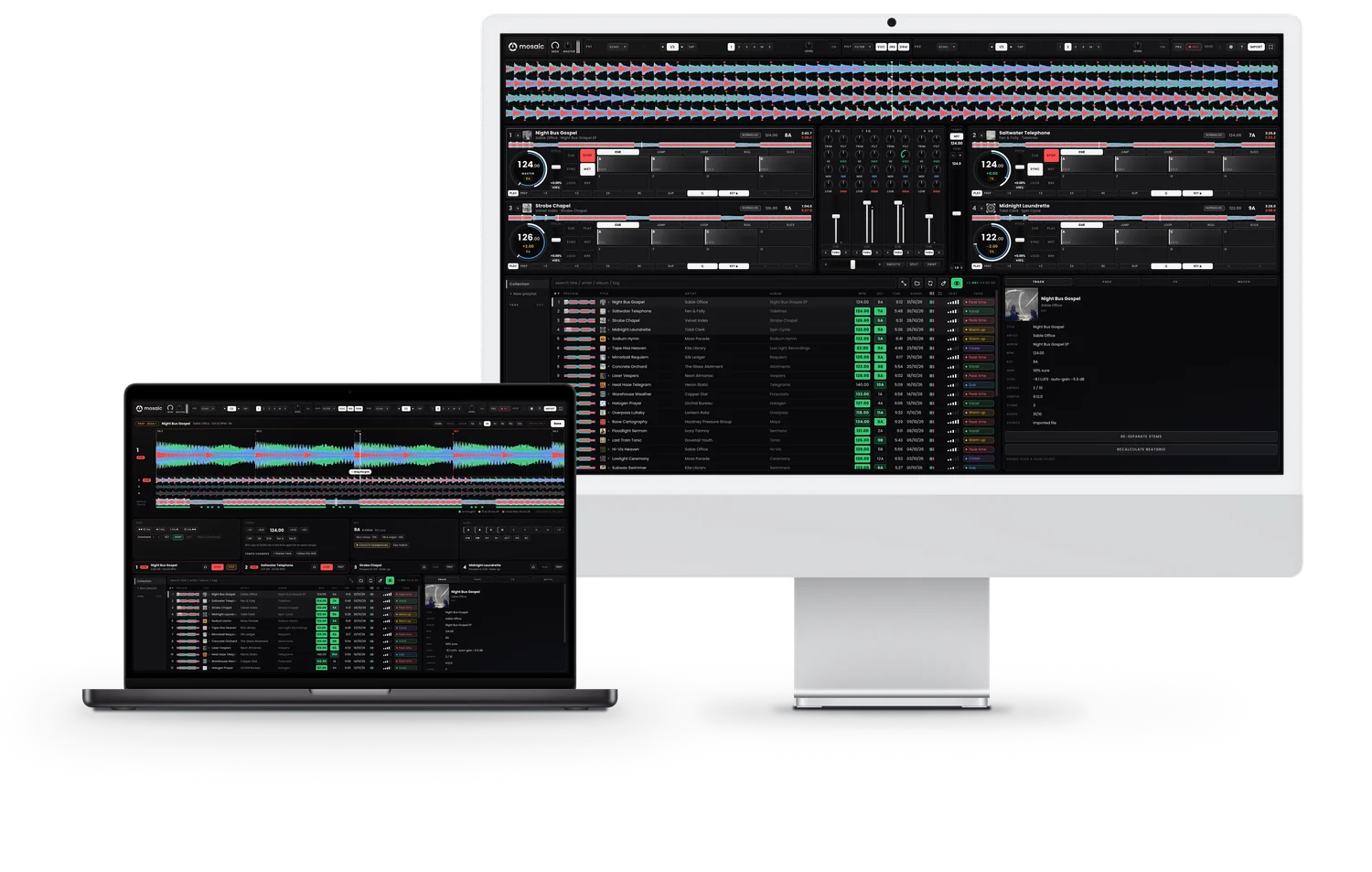
Mosaic separates every track in your library into vocals, instrumental and drums, right on your Mac. Then you can control all three as you mix, on four decks.
Free for 14 days, then your plan starts unless you cancel. For Macs with Apple silicon running macOS 14 or later.
How it plays
Each deck scrolls past in its own lane, with its vocals in green, instrumental in blue and drums in red. Mute a stem, lay one deck's vocals over another's instrumental with SWAP, or shift a deck's key while its drums keep their pitch.

The parts
Take a part out, or drag the playhead along the track. In Mosaic, you hear what's left, and the mix you build is your own.
Play the vocal on its own for an a cappella, or lay it over another track's beat.
Keep the music and lose the words, for the break or the long blend.
Run one track's drums under another's melody. Build the edit live.
Your Mac makes the stems on its own graphics chip, in the background while it's plugged in, before you play them. Nothing is uploaded, and nothing is separated while a deck is playing.
By hand
Drag a deck's lane and the waveform follows your hand. Let go mid-flick and it carries on for a moment. With Q on, the deck lands on the master deck's nearest beat. The platter works the same way: a slow turn moves the track a little, a fast spin moves it a long way.
1Night Bus GospelMASTER124.00
2Saltwater TelephoneDRAG124.10
1Night Bus GospelSTOPPED
0:43.4−5:28.6
In key
KEY LOCK keeps a track in its own key however far you ride the tempo. Key shift moves a deck's key up or down a semitone at a time, and key match puts the deck in a key that mixes with the master deck. MATCH lights up the tracks in your library that will mix with the master deck.
| # | Title | Artist | BPM | Key | Time |
|---|---|---|---|---|---|
| 1 | Sable Office | 124.00 | 8A | 6:12 | |
| 2 | Fen & Folly | 124.00 | 7A | 5:48 | |
| 3 | The Glass Allotment | 123.00 | 8B | 5:54 | |
| 4 | Silk Ledger | 125.00 | 8A | 6:17 | |
| 5 | Kite Library | 62.00 | 9A | 4:48 | |
| 6 | Velvet Index | 126.00 | 5A | 6:31 | |
| 7 | Tidal Clerk | 122.00 | 9A | 5:36 | |
| 8 | Neon Almanac | 128.00 | 8A | 6:02 | |
| 9 | Heron Static | 140.00 | 10A | 5:09 |
Prep
The prep view opens in place of the decks, with the track's grid, tempo, key and cues side by side. A timing bar under the whole track shows how far its kicks are from the beat lines. If a track's tempo wanders, Follow the drift adds tempo changes where it drifts. Each track has its own Undo and Redo.

Everything a set needs
Sixteen hot cues, eight on each page of pads. With Q on, a jump keeps your place in the beat. Press the same pad again and you're straight back at its cue, however fast you press it.
For a MIDI controller Mosaic has no mapping for, press Map a controller. It asks for each control in turn, from the decks to the effects. Use each one, save, and the controller works straight away.
Open a playlist and Mosaic downloads any of its tracks still in iCloud Drive or Dropbox to your Mac, one at a time, and tells you when they're all there.
Keep it in a synced folder, or send it straight to your other Mac. Cues and grids go with it, and stems too if you choose.
Effects locked to the beat, loops, rolls and slices on the pads, a sampler, recording to disk, four-channel output for your headphones, and each deck on its own outputs for an external mixer.
Plug in a controller and press Set up. The master goes to the controller's outputs 1 and 2 and your headphones to 3 and 4, then a short test sound plays in the headphones alone.
Controllers
Mosaic sets up many popular DJ controllers the moment you plug them in. You can map any other MIDI controller yourself, one control at a time.
How it works
Import your files or whole folders, or bring your rekordbox playlists across from an XML export. Your files stay where they are.
Mosaic finds every track's beatgrid, key and loudness, and separates its stems in the background, never while you play.
Four decks on screen, played from your controller, the pads or the keyboard. Record the whole set as you go.
No uploads and no cloud library. Your tracks, cues and stems stay on your own disk. Mosaic works offline for up to 14 days at a time, and it never stops a deck in the middle of a set.
Pricing
Four decks. Stems on every deck. Every feature, one price.
£69 a year
That's £5.75 a month
Try Mosaic free for 14 days. Choose a plan and add a card at checkout. You won't pay anything until the trial ends, and we'll remind you before it does.
Free for 14 days, then £69 a year, renewing automatically until you cancel. Cancel anytime from your account; you keep access until the end of the period you've paid for. Prices include VAT.
For Macs with Apple silicon running macOS 14 or later.
Your library, playlists, cues, grids and stems stay yours to edit, and new tracks are still separated. You hear one track at a time in your headphones. The master output, the sampler and recording are off until you choose a plan, and everything is just where you left it when you do.
Questions
Choose a plan on the pricing page and add a card at checkout. You won't pay anything for 14 days, and after that your plan starts unless you cancel. Then download Mosaic and sign in.
Macs with Apple silicon (M1 or later) running macOS 14 Sonoma or later.
Yes. Mosaic needs to go online once every 14 days to check your licence. If it can't, it switches to Prep mode, but never while a deck is playing.
On your Mac, by its own graphics chip, in the background before you play. Your music is never uploaded anywhere.
Two at a time on one account. To use Mosaic on another Mac, take one off on your account page, or when you sign in on the new one. You can send your library straight from one Mac to the other, or keep it in a synced folder.
Your plan starts unless you cancel, and its first payment is taken that day. We email you 4 days before your free trial ends, and again the day before. If you cancel during the trial, you won't be charged, and Mosaic still plays in full until the trial ends. After that it switches to Prep mode: everything you've prepared stays, and you can keep preparing.
Yes, at any time, from your account page.
Where prices usually include tax, such as VAT in the UK and the EU, ours do too. In some countries, such as the US and Canada, tax is added at checkout instead, and the price on this page says so.
In many countries, your own. Elsewhere, it's US dollars or euros. The pricing page shows your price in the currency you'll pay in.
Yes, if it's one of the many popular DJ controllers Mosaic sets up as soon as you plug it in. You can map any other MIDI controller yourself: open Settings, press Open MIDI beside MIDI controllers, then press Map a controller.
Mosaic puts your playlists on a USB stick in both of the library formats club players read, OneLibrary and Device Library, with your beatgrids, cues, loops and waveforms. It checks every track first, and tells you about any that a player can't load.
Yes. Export your collection from rekordbox as XML, and Mosaic brings across your playlists, cues and beatgrids. It can also bring in your stars and colours as heat and tags.
Not yet. Mosaic is made for the Mac first.
No. There are no analytics, adverts or trackers, and the site sets only the cookies it needs, like the one that keeps you signed in. To show you your price, and again when you start a checkout, our server asks Paddle, our payment partner, for the price in your country, sending it your IP address. We don't keep it. Paddle's own script loads only when you start a checkout, and it may use Paddle's cookies.
Choose a plan on the pricing page and add a card at checkout to start your 14-day free trial. Then download Mosaic and sign in.
Download for MacYou'll need an account to sign in. The installer is signed by us and notarised by Apple.